
Staying on top of tech news is hard. Hacker News moves fast, and by the time you have scrolled through the front page, half your morning is gone. What if you could get a curated, AI-summarised digest of the top stories delivered to your Discord every morning before you have even made coffee?
With ETLR, you can build exactly that in under 50 lines of YAML. No servers to manage, no cron jobs to babysit. Just deploy once and let it run.
What We’re Building
A workflow that:
- Runs every weekday at 8am using a cron schedule
- Fetches the top 5 stories from the Hacker News API
- Retrieves details for each story (title, URL, points, comments)
- Summarises them with GPT-5 into a brief, engaging digest
- Posts to Discord so your team starts the day informed
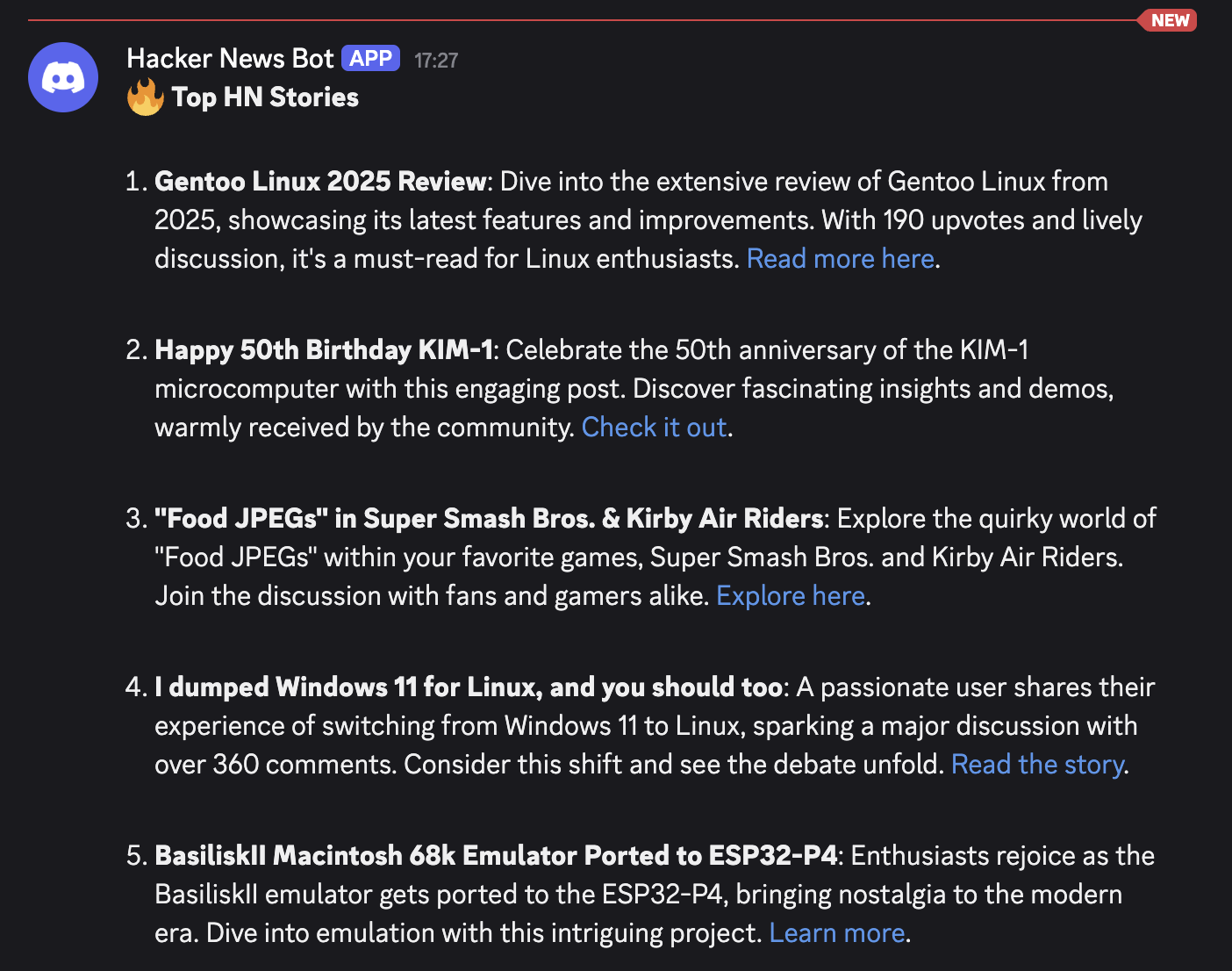
The result? A morning message like this:
The Complete Workflow
Here is the full YAML configuration:
workflow:
  name: hn-morning-digest
  description: Daily HN digest with AI summaries
  environment:
    - name: OPENAI_API_KEY
      secret: true
    - name: DISCORD_WEBHOOK
      secret: true
  input:
    type: cron
    cron: 0 8 * * 1-5
    start_now: true
  steps:
    - type: http_call
      url: https://hacker-news.firebaseio.com/v0/topstories.json
      method: GET
      output_to: story_ids
    - type: jq
      filter: .story_ids.body[:5]
      output_to: top_5_stories
    - type: for_each
      input_from: top_5_stories
      steps:
        - type: http_call
          url: https://hacker-news.firebaseio.com/v0/item/${item}.json
          method: GET
          output_to: story_detail
    - type: openai_completion
      api_key: ${env:OPENAI_API_KEY}
      model: gpt-5-mini
      system: You summarize Hacker News posts. Keep it brief and engaging.
      input_from: top_5_stories
      output_to: summary
    - type: discord_webhook
      webhook_url: ${env:DISCORD_WEBHOOK}
      username: Hacker News Bot
      content_template: |
        🔥 **Top HN Stories**

        ${summary}
Let’s break down each section.
How It Works
1. Scheduling with Cron
input:
  type: cron
  cron: 0 8 * * 1-5
  start_now: true
The workflow runs at 8am Monday to Friday. The start_now: true flag means it will also run immediately when you first deploy, which is perfect for testing.
2. Fetching Top Stories
- type: http_call
  url: https://hacker-news.firebaseio.com/v0/topstories.json
  method: GET
  output_to: story_ids
The Hacker News API returns an array of story IDs, ranked by position on the front page. We store these in story_ids for the next step.
3. Extracting the Top 5
- type: jq
  filter: .story_ids.body[:5]
  output_to: top_5_stories
The jq step is incredibly powerful for JSON manipulation. Here we slice the first 5 story IDs from the array. You could easily change this to 10 or 20 if you want a longer digest.
4. Fetching Story Details
- type: for_each
  input_from: top_5_stories
  steps:
    - type: http_call
      url: https://hacker-news.firebaseio.com/v0/item/${item}.json
      method: GET
      output_to: story_detail
The for_each step iterates over each story ID, fetching the full details (title, URL, score, comment count) from the API. The ${item} variable contains the current story ID in each iteration.
5. AI Summarisation
- type: openai_completion
  api_key: ${env:OPENAI_API_KEY}
  model: gpt-5-mini
  system: You summarize Hacker News posts. Keep it brief and engaging.
  input_from: top_5_stories
  output_to: summary
GPT-5-mini takes the story details and produces a concise, engaging summary. The system prompt keeps things brief. Nobody wants a wall of text at 8am.
You could customise the prompt to:
- Focus on specific topics (AI, startups, programming)
- Add commentary or hot takes
- Include links to the original stories
- Translate into another language
6. Posting to Discord
- type: discord_webhook
  webhook_url: ${env:DISCORD_WEBHOOK}
  username: Hacker News Bot
  content_template: |
    🔥 **Top HN Stories**

    ${summary}
The Discord webhook step posts the final summary to your channel as ‘Hacker News Bot’. The template supports Markdown formatting, so you can add bold text, links, and emoji.
The Workflow Graph
Here is how the workflow looks in the ETLR dashboard:
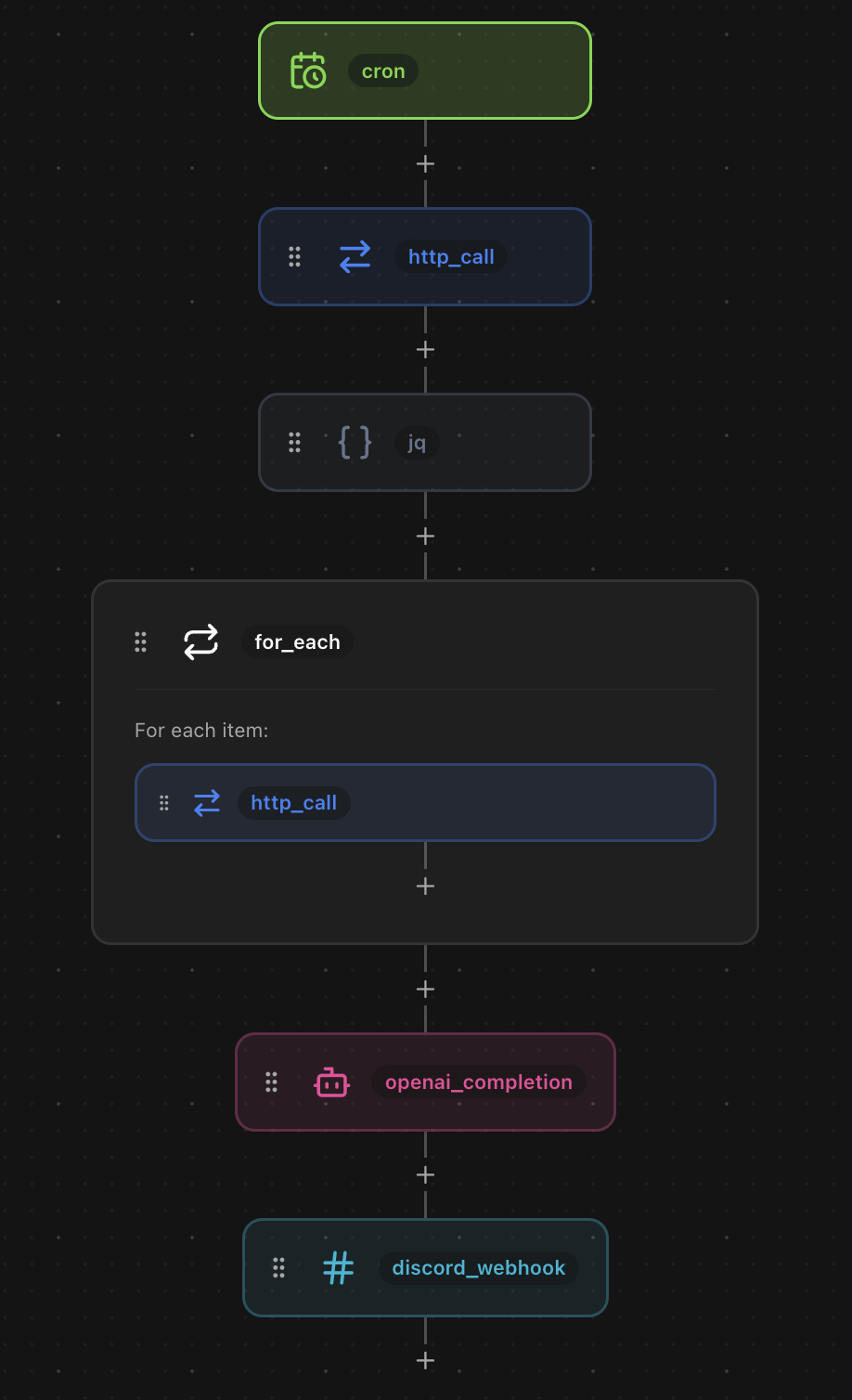
Each step flows into the next, with the for_each loop clearly showing the parallel fetches for each story.
Environment Variables
The workflow uses two secrets:
- OPENAI_API_KEY: Your OpenAI API key for gpt-5-mini
- DISCORD_WEBHOOK: The webhook URL for your Discord channel
Set these in the ETLR dashboard under Environment Variables and mark them as secrets so they are encrypted at rest.
Customisation Ideas
This is just the starting point. Here are some ways to extend the workflow:
Filter by Topic
Add a filtering step to only include stories about specific topics:
- type: openai_completion
  api_key: ${env:OPENAI_API_KEY}
  model: gpt-5-mini
  system: |
    Filter these Hacker News stories to only include those about AI,
    machine learning, or LLMs. Return the filtered list as JSON.
  input_from: top_5_stories
  output_to: ai_stories
Send to Slack Instead
Swap Discord for Slack with a one-line change:
- type: slack_webhook
  webhook_url: ${env:SLACK_WEBHOOK}
  username: Hacker News Bot
  text_template: |
    🔥 *Top HN Stories*

    ${summary}
Add Email Delivery
Send the digest to your inbox:
- type: sendgrid
  api_key: ${env:SENDGRID_API_KEY}
  from_email: digest@yourcompany.com
  to: team@yourcompany.com
  subject: "🔥 Your HN Morning Digest"
  html: |
    <h1>Top Hacker News Stories</h1>
    <p>${summary}</p>
Multiple Channels
Post to different channels for different teams:
- type: discord_webhook
  webhook_url: ${env:ENGINEERING_WEBHOOK}
  content_template: "🔧 **Engineering Digest**\n\n${summary}"

- type: discord_webhook
  webhook_url: ${env:PRODUCT_WEBHOOK}
  content_template: "📦 **Product Digest**\n\n${summary}"
Scrape and Summarise Each Article
Want deeper summaries? Scrape the actual article content and summarise each one individually:
- type: for_each
  input_from: top_5_stories
  steps:
    - type: http_call
      url: ${item.url}
      method: GET
      output_to: page_content
    - type: openai_completion
      api_key: ${env:OPENAI_API_KEY}
      model: gpt-5-mini
      system: |
        Summarise this article in 2-3 sentences. Focus on the key
        takeaways and why it matters to developers.
      prompt: |
        Title: ${item.title}
        Content: ${page_content.body}
      output_to: article_summary
This gives you a much richer digest with actual article content rather than just titles. Each story gets its own AI summary based on the full page content. You could even add a chunk_text step before the summarisation if the articles are particularly long.
Deploying the Workflow
Save the YAML as hn-digest.yaml and deploy with one command:
etlr deploy hn-digest.yamlThat is it. The workflow will run at 8am every weekday, and you will have your AI-curated Hacker News digest waiting in Discord.
Ready to build your own morning digest? Get started with ETLR or explore the documentation.
Have questions? Join our Discord community or check out more workflow examples.