
Environment Variables
Securely manage configuration values and secrets for your workflows
What are Environment Variables?
Environment variables are key-value pairs that store configuration data and sensitive information outside of your workflow code. They allow you to:
- Keep API keys, tokens, and passwords secure
- Separate configuration from code
- Use different values across environments (dev, staging, production)
- Share workflows without exposing sensitive data
Setting Up Environment Variables
Environment variables are managed through the ETLR platform dashboard. Navigate to the Environment Variables section to add, edit, or remove variables.
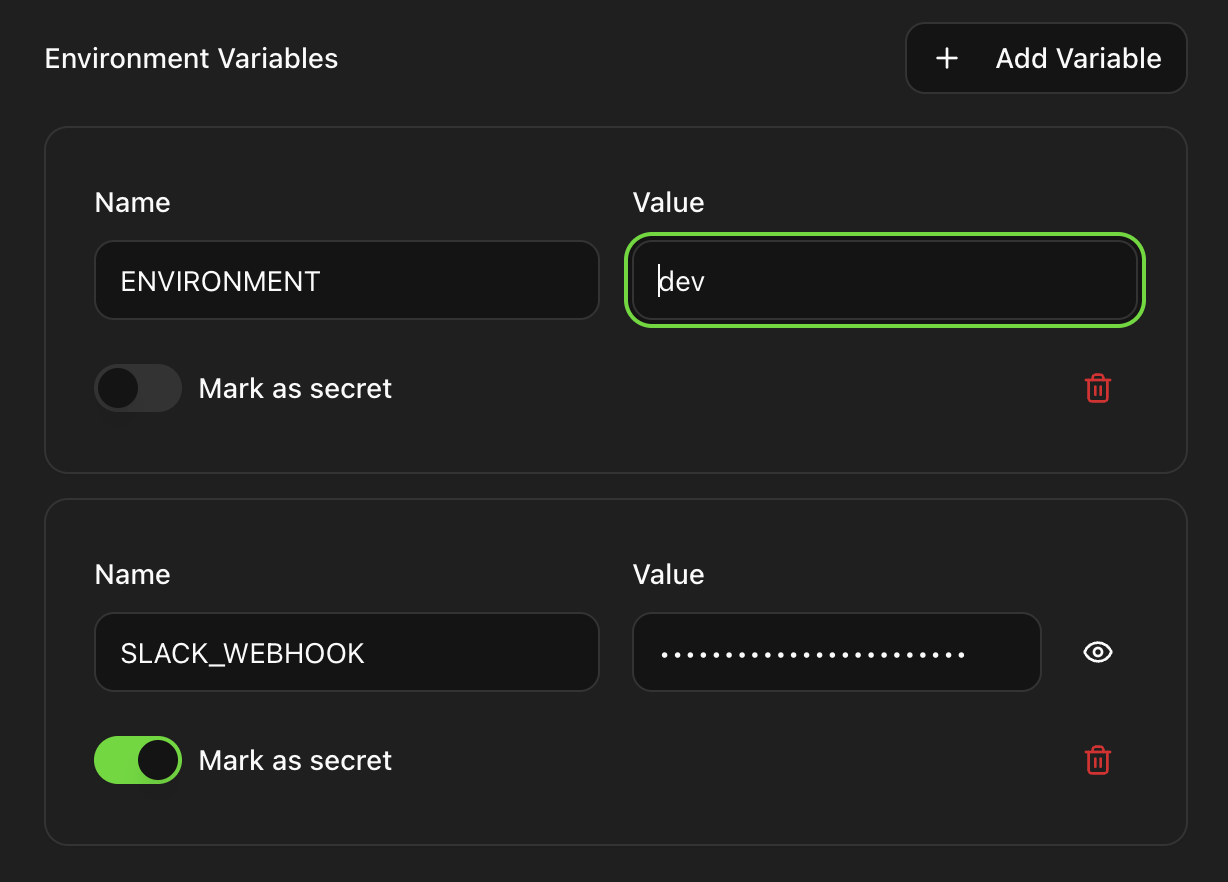
Add a Variable
Click the "Add Variable" button to create a new environment variable.
Enter Name and Value
Provide a name (e.g., SLACK_WEBHOOK_URL) and its corresponding value. Variable
names should be uppercase with underscores.
Mark as Secret
Toggle "Mark as secret" for sensitive values like API keys and passwords. Secret values are encrypted and hidden in the UI.
Save and Use
Once saved, the variable becomes immediately available within your workflow
using the syntax ${env:VARIABLE_NAME}.
Using Environment Variables in Workflows
Reference environment variables in your workflow YAML using the syntax ${env:VARIABLE_NAME}.
The value will be automatically substituted when the workflow runs.
Basic Example
name: Send Slack Notification
inputs:
  - name: webhook
    type: http
    method: POST
    url: ${env:SLACK_WEBHOOK_URL}
    headers:
      Content-Type: application/json
    body: |
      {
        "text": "Workflow completed successfully!"
      }
Using Multiple Variables
name: API Integration Workflow
inputs:
  - name: fetch_data
    type: http
    method: GET
    url: ${env:API_BASE_URL}/users
    headers:
      Authorization: Bearer ${env:API_TOKEN}
      X-Environment: ${env:ENVIRONMENT}
Security Best Practices
Encrypted Storage
All environment variables are stored in an encrypted database. When marked as secret, values are additionally masked in the UI and logs, providing multiple layers of security.
- Always mark sensitive data as secret: API keys, tokens, passwords, and any credentials should always have the "Mark as secret" toggle enabled.
- Use descriptive naming: Name variables clearly to indicate their purpose (e.g.,
STRIPE_SECRET_KEY, not justSECRET_KEY). - Rotate secrets regularly: Update sensitive credentials periodically and whenever team members with access leave.
- Limit access: Only share environment variables with team members who need them for their workflows.
Common Use Cases
API Authentication
Store API keys, OAuth tokens, and bearer tokens for secure API access.
Webhook URLs
Keep webhook endpoints (Slack, Discord, etc.) configurable without code changes.
Environment Configuration
Define environment names (dev, staging, production) and base URLs.
Database Credentials
Securely store database connection strings and credentials.