
Your sales team is drowning in leads. Someone fills out a form with a Gmail address. Another uses a corporate email from a Fortune 500 company. Both go into the same queue. By the time your team researches each lead, the hot prospects have gone cold.
What if every lead was instantly enriched with company data, scored by AI for sales potential, and high-value prospects were routed directly to your team with a personalised icebreaker ready to send?
With ETLR, you can build exactly that. No CRM plugins, no manual research, no qualified leads slipping through the cracks. Just deploy once and let AI handle the qualification.
What We’re Building
A workflow that:
- Receives leads via webhook from your form or CRM
- Extracts company domain from email address
- Enriches with Brandfetch API to get company size, funding, and description
- Scores with GPT-4 using B2B sales criteria
- Filters high-value leads (70+ score) and routes to Slack
- Generates personalised icebreakers for your sales team
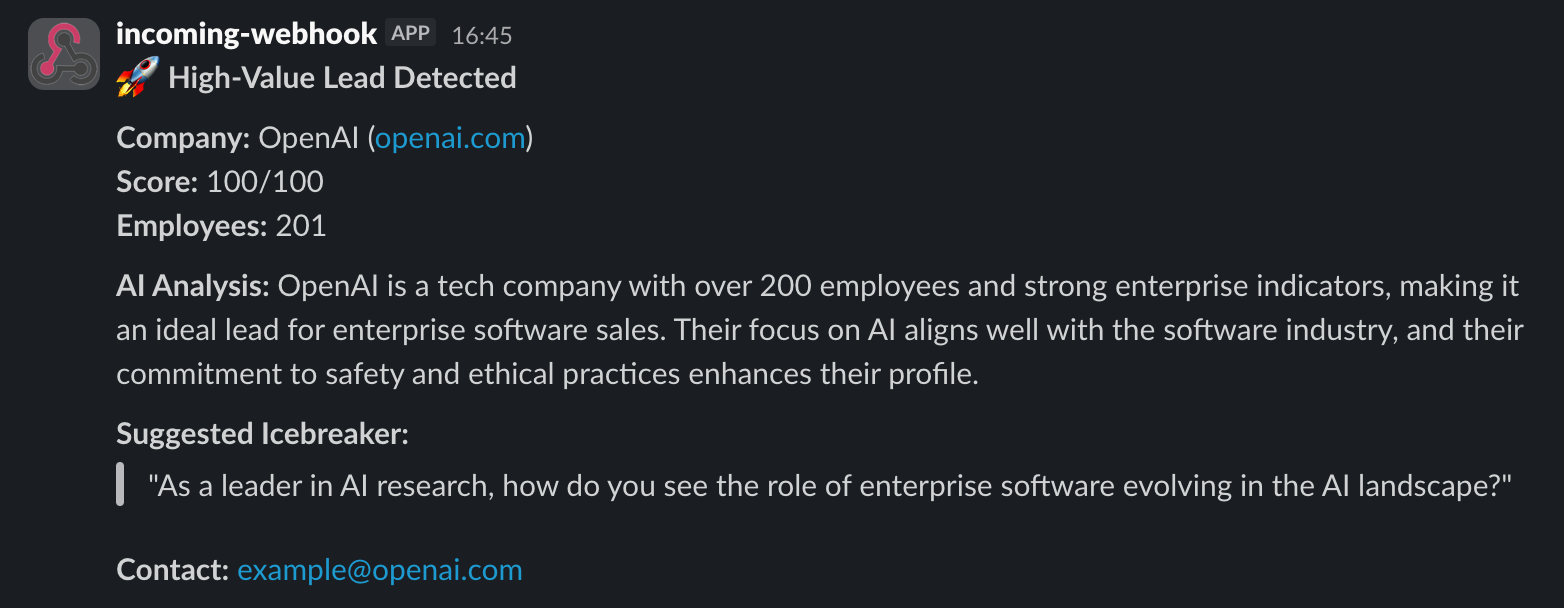
The result? High-value leads in Slack within seconds, ready to contact:
The Complete Workflow
Here is the full YAML configuration:
workflow:
  name: enriched-lead-scoring
  environment:
    - name: BRANDFETCH_API_KEY
      secret: true
    - name: OPENAI_API_KEY
      secret: true
    - name: SLACK_WEBHOOK_URL
      secret: true
  input:
    type: http_webhook
  steps:
    - type: python_function
      handler: process
      code: |
        def process(event):
            email = event.get('email', '')
            if '@' in email:
                domain = email.split('@')[1]
                event['extracted'] = {'domain': domain}
            return event
    - type: http_call
      url: https://api.brandfetch.io/v2/brands/${extracted.domain}
      method: GET
      headers:
        Authorization: Bearer ${env:BRANDFETCH_API_KEY}
      output_to: company_data
      drop_on_failure: false
      timeout: 10
    - type: openai_completion
      model: gpt-4o-mini
      api_key: ${env:OPENAI_API_KEY}
      system: |
        You are a B2B lead scoring analyst. Analyze leads for Enterprise Software sales.
        Return ONLY valid JSON with this structure:
        {"score": <number 0-100>, "summary": "<brief analysis>", "icebreaker": "<personalized opening line>"}

        Scoring criteria:
        - Tech/SaaS companies: +30 points
        - 50-200 employees: +20 points
        - 200+ employees: +30 points
        - Enterprise indicators: +20 points
      prompt: |
        Analyze this lead:

        Email: ${email}
        Company: ${company_data.body.name}
        Founded: ${company_data.company.foundedYear}
        Employees: ${company_data.body.company.employees}
        Description: ${company_data.body.longDescription}
        Quality Score: ${company_data.body.qualityScore}

        Score this lead (0-100) and provide analysis.
      response_format:
        type: json_object
      output_to: analysis
      temperature: 0.3
    - type: filter
      groups:
        - conditions:
          - field: analysis.score
            op: gte
            value: 70
    - type: slack_webhook
      webhook_url: ${env:SLACK_WEBHOOK_URL}
      text_template: |
        🚀 *High-Value Lead Detected*

        *Company:* ${company_data.body.name} (${extracted.domain})
        *Score:* ${analysis.score}/100
        *Employees:* ${company_data.body.company.employees}

        *AI Analysis:* ${analysis.summary}

        *Suggested Icebreaker:*
        > "${analysis.icebreaker}"

        *Contact:* ${email}
Let’s break down each section.
How It Works
1. Webhook Input
input:
  type: http_webhook
The workflow listens for incoming leads from your website form, landing page, or CRM. Whenever someone submits their email, this workflow triggers automatically.
2. Domain Extraction
- type: python_function
  handler: process
  code: |
    def process(event):
        email = event.get('email', '')
        if '@' in email:
            domain = email.split('@')[1]
            event['extracted'] = {'domain': domain}
        return event
The Python function step extracts the company domain from the email address. john@acme.com becomes acme.com, which we use for enrichment.
This runs inline, no external function deployment needed. Perfect for simple data transformations.
3. Company Enrichment
- type: http_call
  url: https://api.brandfetch.io/v2/brands/${extracted.domain}
  method: GET
  headers:
    Authorization: Bearer ${env:BRANDFETCH_API_KEY}
  output_to: company_data
  drop_on_failure: false
  timeout: 10
The HTTP call step queries Brandfetch API for company data. Brandfetch returns:
- Company name and description
- Employee count
- Founding year
- Industry and category
- Social media presence
- Quality score (how complete the data is)
drop_on_failure: false ensures the workflow continues even if the domain is not found. Consumer emails (Gmail, Outlook) will not match, but we still want to process them.
4. AI-Powered Scoring
- type: openai_completion
  model: gpt-4o-mini
  api_key: ${env:OPENAI_API_KEY}
  system: |
    You are a B2B lead scoring analyst. Analyze leads for Enterprise Software sales.
    Return ONLY valid JSON with this structure:
    {"score": <number 0-100>, "summary": "<brief analysis>", "icebreaker": "<personalized opening line>"}

    Scoring criteria:
    - Tech/SaaS companies: +30 points
    - 50-200 employees: +20 points
    - 200+ employees: +30 points
    - Enterprise indicators: +20 points
  prompt: |
    Analyze this lead:

    Email: ${email}
    Company: ${company_data.body.name}
    Founded: ${company_data.company.foundedYear}
    Employees: ${company_data.body.company.employees}
    Description: ${company_data.body.longDescription}
    Quality Score: ${company_data.body.qualityScore}

    Score this lead (0-100) and provide analysis.
  response_format:
    type: json_object
  output_to: analysis
  temperature: 0.3
The OpenAI completion step analyses the enriched data and returns structured scoring. We use gpt-4o-mini for speed and cost efficiency.
The scoring criteria are explicit in the system prompt:
- Tech/SaaS companies: Your ideal customers
- Company size: Sweet spot for your sales process
- Enterprise indicators: Budget and decision-making authority
temperature: 0.3 keeps responses consistent and focused. We also generate a personalised icebreaker based on the company description, so your sales team does not start with “I see you work at…“
5. High-Value Lead Filter
- type: filter
  groups:
    - conditions:
      - field: analysis.score
        op: gte
        value: 70
The filter step only passes leads scoring 70 or above. Everything else is dropped. No noise, no low-value leads clogging your Slack channel.
Adjust this threshold based on your team’s capacity. More leads? Raise to 80. Need more volume? Lower to 60.
6. Slack Alert with Context
- type: slack_webhook
  webhook_url: ${env:SLACK_WEBHOOK_URL}
  text_template: |
    🚀 *High-Value Lead Detected*

    *Company:* ${company_data.body.name} (${extracted.domain})
    *Score:* ${analysis.score}/100
    *Employees:* ${company_data.body.company.employees}

    *AI Analysis:* ${analysis.summary}

    *Suggested Icebreaker:*
    > "${analysis.icebreaker}"

    *Contact:* ${email}
The Slack webhook step sends a formatted alert with everything your sales team needs:
- Company name and domain
- AI-generated score
- Company size
- Analysis summary
- Personalised icebreaker ready to send
- Contact email
No manual research. No context switching. Just click and reach out.
The Workflow Graph
Here is how the workflow looks in the ETLR dashboard:
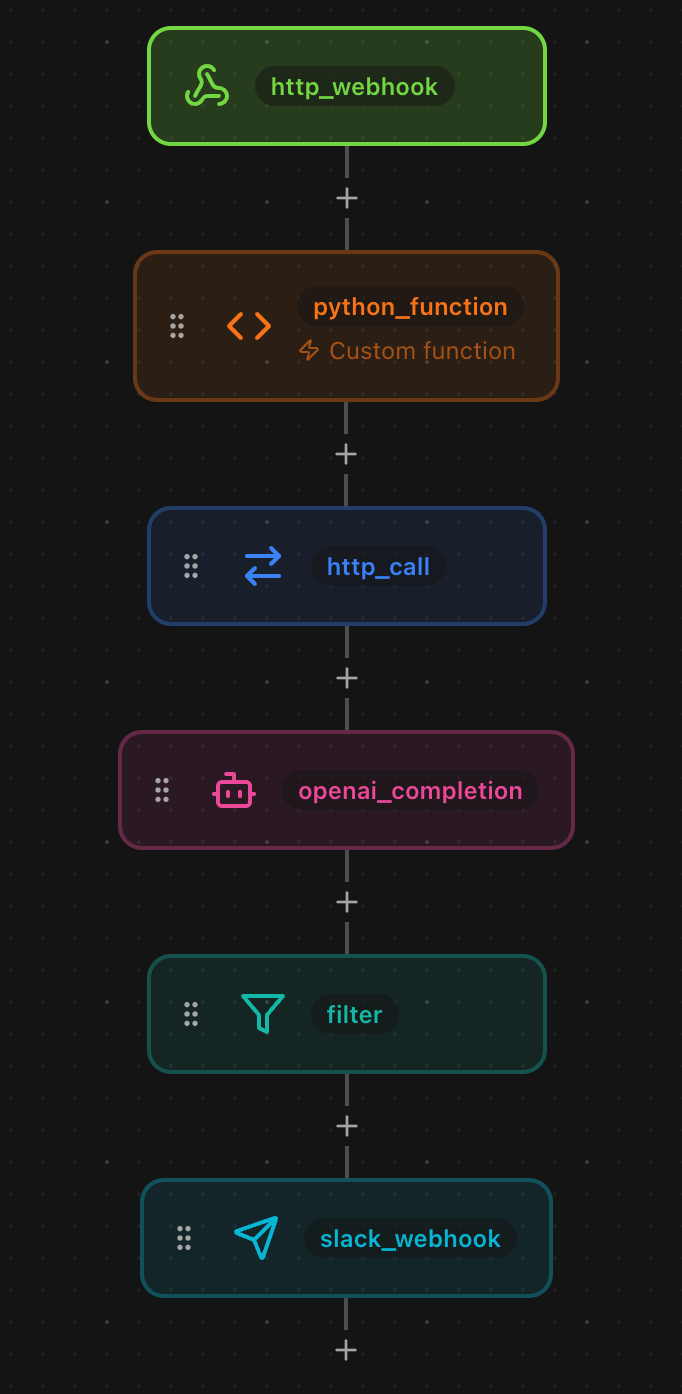
The linear flow shows domain extraction, enrichment, AI scoring, filtering, and Slack notification.
Environment Variables
The workflow uses three secrets:
- BRANDFETCH_API_KEY: Your Brandfetch API key from brandfetch.com
- OPENAI_API_KEY: Your OpenAI API key for GPT-4o-mini
- SLACK_WEBHOOK_URL: The webhook URL for your sales Slack channel
Set these in the ETLR dashboard under Environment Variables and mark them as secrets so they are encrypted at rest.
Why This Works
Traditional lead scoring fails because:
- Manual research takes time: By the time you qualify a lead, they have moved on
- Simple rules miss context: “Contains @enterprise.com” does not mean enterprise budget
- No personalisation: Generic outreach gets ignored
- Data silos: Lead form → CRM → enrichment → scoring → notification takes hours
AI-powered scoring solves this by:
- Instant qualification: From form submission to Slack in under 3 seconds
- Contextual understanding: “Series B funded, 150 employees, hiring” scores higher than “5 employees, bootstrapped”
- Personalised icebreakers: AI reads the company description and suggests relevant opening lines
- Unified workflow: One YAML file handles form → enrichment → scoring → notification
Customisation Ideas
This is just the starting point. Here are some ways to extend the workflow:
Score with Multiple Data Sources
Combine Brandfetch with Clearbit or LinkedIn for richer data:
- type: http_call
  url: https://api.brandfetch.io/v2/brands/${extracted.domain}
  method: GET
  headers:
    Authorization: Bearer ${env:BRANDFETCH_API_KEY}
  output_to: brandfetch_data
  drop_on_failure: false

- type: http_call
  url: https://company.clearbit.com/v2/companies/find?domain=${extracted.domain}
  method: GET
  headers:
    Authorization: Bearer ${env:CLEARBIT_API_KEY}
  output_to: clearbit_data
  drop_on_failure: false

- type: openai_completion
  api_key: ${env:OPENAI_API_KEY}
  model: gpt-4o-mini
  system: "You are a B2B lead scoring analyst. Score leads 0-100 based on company data."
  prompt: |
    Analyze using both data sources:

    Brandfetch: ${brandfetch_data.body}
    Clearbit: ${clearbit_data.body}

    Score this lead (0-100).
  response_format:
    type: json_object
  output_to: combined_analysis
  temperature: 0.3
Auto-Create CRM Records
Send qualified leads directly to Salesforce:
- type: salesforce
  username: ${env:SALESFORCE_USERNAME}
  password: ${env:SALESFORCE_PASSWORD}
  security_token: ${env:SALESFORCE_SECURITY_TOKEN}
  operation: create
  sobject: Lead
  data:
    Email: ${email}
    Company: ${company_data.body.name}
    LastName: ${email}
    LeadSource: Website
    Status: Open - Not Contacted
    Rating: Hot
    Description: |
      AI Score: ${analysis.score}/100

      Analysis: ${analysis.summary}

      Suggested Icebreaker: ${analysis.icebreaker}
  output_to: salesforce_lead
Send to Different Channels by Score
Route leads to different Slack channels based on score:
- type: if_else
  if:
    conditions:
      - field: analysis.score
        op: gte
        value: 90
    steps:
      - type: slack_webhook
        webhook_url: ${env:HOT_LEADS_SLACK}
        text_template: "🔥 EXTREMELY HOT LEAD: ${company_data.body.name}"
  else_if:
    - conditions:
        - field: analysis.score
          op: gte
          value: 70
      steps:
        - type: slack_webhook
          webhook_url: ${env:QUALIFIED_LEADS_SLACK}
          text_template: "✅ Qualified Lead: ${company_data.body.name}"
Email Personalised Follow-Up
Auto-send the icebreaker via email:
- type: resend_email
  api_key: ${env:RESEND_API_KEY}
  from_email: sales@yourcompany.com
  to_template: ${email}
  subject_template: "Quick question about ${company_data.body.name}"
  html_template: |
    <p>${analysis.icebreaker}</p>

    <p>Would love to show you how we help companies like ${company_data.body.name}.</p>

    <p>Open to a quick call this week?</p>
  output_to: email_result
Track Lead Quality Over Time
Log scores to analytics for conversion analysis:
- type: segment
  write_key: ${env:SEGMENT_WRITE_KEY}
  operation: track
  user_id: ${email}
  event: Lead Scored
  properties:
    company: ${company_data.body.name}
    domain: ${extracted.domain}
    score: ${analysis.score}
    employees: ${company_data.body.company.employees}
    source: website_form
A/B Test Different Icebreakers
Generate multiple icebreakers and test which converts:
- type: openai_completion
  api_key: ${env:OPENAI_API_KEY}
  model: gpt-4o-mini
  system: |
    Generate 3 different icebreaker styles for sales outreach.
    Return JSON with keys: casual, professional, value_focused
  prompt: |
    Company: ${company_data.body.name}
    Description: ${company_data.body.longDescription}

    Generate 3 icebreakers in different styles.
  response_format:
    type: json_object
  output_to: icebreaker_variants
  temperature: 0.7

- type: slack_webhook
  webhook_url: ${env:SLACK_WEBHOOK_URL}
  text_template: |
    🚀 High-Value Lead: ${company_data.body.name}

    *Icebreaker A (Casual):* ${icebreaker_variants.casual}
    *Icebreaker B (Professional):* ${icebreaker_variants.professional}
    *Icebreaker C (Value):* ${icebreaker_variants.value_focused}

    Pick one and reply!
Integrating with Lead Sources
Most form builders and CRMs support webhooks. Here is how to connect them:
Typeform
- Go to your form settings → Webhooks
- Add webhook URL pointing to your ETLR workflow
- Select “On form submit” trigger
- Map email field to payload
HubSpot Forms
- Go to Marketing → Forms → Form settings
- Add webhook notification to your ETLR URL
- Include contact properties in payload
- Test with a sample submission
Webflow Forms
- Install Webflow Logic or Zapier integration
- Trigger on form submission
- Send POST request to ETLR webhook URL
- Include form fields in JSON body
Custom Form
Add this JavaScript to your form:
document.getElementById('leadForm').addEventListener('submit', async (e) => {
  e.preventDefault();

  const email = document.getElementById('email').value;

  await fetch('https://pipeline.etlr.io/v1/webhooks/{org_id}/{workflow_id}/{hash}', {
    method: 'POST',
    headers: { 'Content-Type': 'application/json' },
    body: JSON.stringify({ email })
  });

  alert('Thanks! We\'ll be in touch soon.');
});
Deploying the Workflow
Save the YAML as lead-scoring.yaml and deploy with one command:
etlr deploy lead-scoring.yamlThat is it. Every new lead will be enriched, scored, and qualified within seconds, with high-value prospects routed directly to your sales team.
Ready to stop losing qualified leads? Get started with ETLR or explore the documentation.
Have questions? Join our Discord community or check out more workflow examples.